Sign off every transaction as properly approved
For the accountant who closes the books with evidence.
Internal controls from your directory
Internal controls start from your company’s directory: connect Google Workspace or Microsoft Entra ID first. Then add where supplier invoices are approved: BILL, Ramp or Mercury, or BILL’s Bill Approval Audit report as a file. No questionnaire.
Start freeRessura reads who is in your company, their admin roles and, where the directory records it, when each last signed in, and changes nothing in your directory. Only your company’s admins see their names, Ressura staff only when their work needs it, and they stay until you close the company.
Connecting the directory takes its admin, so if that is not you, ask your IT or security admin to approve it.
Example: Quillfield, an invented company
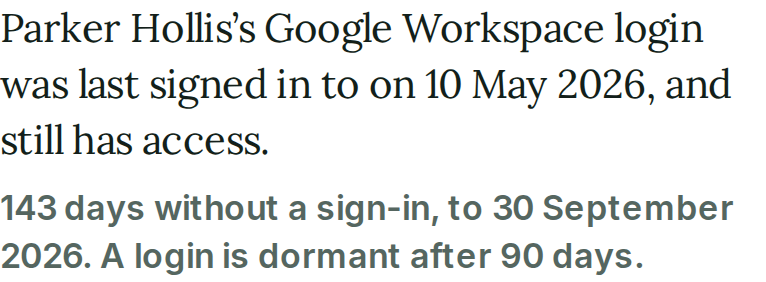
A dormant login with access.
The Finding rests on the login’s last sign-in as Google Workspace gives it and the access the person still holds on Xero’s user list, and its page shows the day the login went dormant. What happens to the Finding is your decision.

01
Segregation of duties testing across the year
The auditor tests segregation of duties across the whole year, not how the roles stand today. When someone leaves, their duties can fall to the one person left.
Ressura checks who created, approved and paid every supplier invoice each time the approvals come in. “The approver also paid” and “The same person created and approved” show a gap at the first check after it opens.
Split duties where you can, and keep a compensating control where you cannot.
When the team is too small to split them, Ressura is the second pair of eyes, independent of your accounting system: every payment checked against its evidence, on a dated record.
“The split held all year, and here is the record.”
02
Approval matrix for supplier invoices and journals
An approval matrix breaks when one name signs off every supplier invoice, or someone posts a manual journal and approves it too.
Ressura reads who approved each supplier invoice in BILL, Ramp or Mercury, and when. “One person approves everything” shows the first, and every manual journal gets a second look.
“Every supplier invoice and journal approved by someone else.”
03
User access review
A user access review finds a login that still works months after its last use, and an admin login nobody has reviewed.
Ressura reads who has a login, who is an admin and when each last signed in. It changes nothing.
“Access reviewed and dated this quarter.”
04
Month-end cutoff and prepaid expenses
A cutoff error is a supplier invoice booked in the wrong month, and a prepaid expense goes wrong when a year of software paid ahead is expensed in March.
Ressura checks that every supplier invoice lands in its month and a year paid ahead is spread across the year, and keeps the evidence for each.
“Every invoice in its month, with the evidence.”
05
Fraud risk inquiries from the auditor
In every audit’s fraud risk inquiries, the auditor asks how management finds and handles fraud risk.
The answer is Ressura’s record: every deposit matched to the payments posted, every year-end journal with its evidence, and last year’s estimates beside what happened.
“Here is how we watch for fraud, and the record of it.”
Then connect BILL
Connect BILL to run every approval Check on every supplier invoice, with who created it, who approved it and who paid it.
Split duties where you can, and keep a compensating control where you cannot.
When the team is too small to split them, Ressura is the second pair of eyes, independent of your accounting system: every payment checked against its evidence, on a dated record.
Do your internal controls show who can approve and pay?
Internal controls start from your company’s directory: connect Google Workspace or Microsoft Entra ID first. Then add where supplier invoices are approved: BILL, Ramp or Mercury, or BILL’s Bill Approval Audit report as a file. No questionnaire.
Start free